How to Choose an Invoice Template That Suits Your Business
What makes an invoice clear and professional, and how to pick a template that fits your business. Includes examples for freelancers, trades, consultants, creatives and more.
Your invoice is often the last thing a client sees from you before they pay. A clear, professional invoice gets paid faster, raises fewer questions and makes a small business look established.
A messy one does the opposite. If a client has to email you to ask what an amount is for, or where to pay, your money is already late.
This guide explains what makes an invoice clear and professional, how to choose a template that suits your type of business, and what a good invoice looks like for different kinds of work.
The short answer
A good invoice template does three jobs:
- It makes the amount due and the due date impossible to miss.
- It shows clearly what the client is paying for, line by line.
- It tells the client exactly how to pay you, with your banking details on the page.
After that, choose a look that matches how your clients see you. A plumber and a brand designer both need clear invoices, but they don't need the same style.
What makes an invoice clear
Clarity comes before style. Before you think about colours or fonts, check that your template does these things well.
The total and due date stand out
The client's first question is "how much, and by when?" The total due and the due date should be the two easiest things to find on the page. If they're the same size as everything else, the client has to hunt.
Line items say what the work actually was
"Services rendered: R12,000" invites questions. "Website homepage design, 1 x R7,500" and "Two rounds of revisions, 2 x R2,250" don't.
Good line items include:
- A short, specific description the client will recognise.
- The quantity (hours, days, units or items).
- The unit price and the line total.
Payment details are on the invoice, not in a separate email
Put your bank name, account name, account number, branch code and a payment reference on the invoice itself. Ask clients to use the invoice number as their reference, so you can match payments easily.
Both parties are clearly identified
Your business name, contact details and address go at the top. The client's name and address go in a clearly labelled Bill To section. If your client needs a company registration number or purchase order number on the invoice, add it.
It has a unique number and a date
Every invoice needs its own invoice number and an invoice date. Numbers should follow a sequence, such as INV-001, INV-002, so nothing gets skipped or duplicated.
If you're VAT registered, SARS has specific rules about what a tax invoice must show. Read our guide to valid tax invoice requirements in South Africa before you choose a layout.
What makes an invoice look professional
Once the basics are clear, a few details make the difference between "homemade" and "established".
- Your logo at the top. Even a simple text logo makes the invoice instantly recognisable.
- Consistent colours. Use one or two colours that match your brand, website or signage. Avoid using every colour at once.
- Plenty of white space. A crowded invoice looks stressful. Space between sections helps the client read it quickly.
- Readable fonts. Clear, simple fonts in a sensible size. Decorative fonts belong on wedding invitations, not invoices.
- The same template every time. Clients recognise your invoices faster, and your business looks organised.
- A PDF, not a Word document. PDFs look the same on every device and can't be edited by accident.
- No spelling mistakes. Check client names especially. Getting a client's company name wrong is an easy way to look careless.
How to choose the right template
Ask yourself four questions.
1. How many line items do you usually have?
If most invoices have one to three lines, a minimal layout with lots of space looks clean and confident. If you regularly bill for many products, parts or sessions, choose a structured, grid-style layout that keeps long lists easy to scan.
2. Who are your clients?
Corporate clients and government departments expect a traditional, businesslike invoice that their accounts department can process quickly. Individual clients and small businesses often respond well to something warmer and simpler. Creative clients expect your invoice to look as considered as your work.
3. What does your brand look like?
Your invoice should feel like it comes from the same business as your website, business cards and social media. If your brand is bold and dark, a dark template will feel right. If it's light and minimal, choose a light, minimal template.
4. Do you need room for extra details?
Some businesses need space for terms and conditions, project notes, purchase order numbers or registration numbers. Make sure the template you choose has a place for these without looking crammed.
Invoice template examples for different businesses
Here is how different businesses can approach their invoices, with an example of the line items each might include. The template names are the ones available in Eazy-Biz.
Freelance designers, writers and photographers
Look for: a modern, minimal layout with strong typography. Your invoice is a small example of your taste.
Try: Modern Minimal or Clean Minimal.
| Description | Qty | Unit price | Total |
|---|---|---|---|
| Logo design, three concepts | 1 | R6,500 | R6,500 |
| Brand colour and font guide | 1 | R2,800 | R2,800 |
| Social media profile images | 4 | R350 | R1,400 |
Tip: add a note about usage rights or the number of revision rounds included.
Consultants, bookkeepers and professional services
Look for: a clean, corporate layout that feels trustworthy and is easy for a finance team to process.
Try: Professional Blue or Classic Simple.
| Description | Qty | Unit price | Total |
|---|---|---|---|
| Monthly bookkeeping, October | 1 | R3,500 | R3,500 |
| Payroll processing (per employee) | 6 | R150 | R900 |
| Advisory call, 1 hour | 1 | R850 | R850 |
Tip: state your payment terms clearly, such as "Payment due within 14 days".
Builders, plumbers, electricians and other trades
Look for: a straightforward, traditional layout that shows labour and materials separately and puts your banking details front and centre.
Try: Classic Simple or Corporate Grid.
| Description | Qty | Unit price | Total |
|---|---|---|---|
| Labour: geyser replacement (hours) | 4 | R550 | R2,200 |
| 150L geyser | 1 | R7,800 | R7,800 |
| Fittings and valves | 1 | R1,150 | R1,150 |
| Call-out fee | 1 | R450 | R450 |
Tip: splitting labour and materials helps clients understand the price and reduces disputes.
Training providers, suppliers and businesses with long invoices
Look for: a grid-based layout where many rows stay neat and easy to read.
Try: Corporate Grid.
| Description | Qty | Unit price | Total |
|---|---|---|---|
| First Aid Level 1 training (per delegate) | 12 | R1,250 | R15,000 |
| Training manuals | 12 | R180 | R2,160 |
| Certificates | 12 | R60 | R720 |
Tip: include the course dates and the client's purchase order number if they gave you one.
Cafés, caterers, event planners and friendly local brands
Look for: something warm and approachable, with a bit of colour.
Try: Minimal Yellow.
| Description | Qty | Unit price | Total |
|---|---|---|---|
| Catering, 40 guests (per person) | 40 | R285 | R11,400 |
| Coffee station, half day | 1 | R1,800 | R1,800 |
| Delivery and setup | 1 | R650 | R650 |
Tip: if you took a deposit, show it as a separate line so the balance due is clear. Our guide to the quote-to-invoice workflow explains how to keep deposits and final invoices in order.
Tech, IT support and digital agencies
Look for: a bold, modern style that matches a tech brand, or a layout built for recurring services.
Try: Dark Professional, or Domain Registry for hosting, domains and subscription-style services.
| Description | Qty | Unit price | Total |
|---|---|---|---|
| Website hosting, monthly | 1 | R250 | R250 |
| Domain renewal (.co.za), annual | 1 | R120 | R120 |
| IT support retainer, monthly | 1 | R2,500 | R2,500 |
Tip: for services billed every month, set up a recurring invoice so it goes out on schedule.
Common invoice design mistakes
Avoid these, whatever template you use:
- Hiding the total in small print or the middle of the page.
- Vague descriptions like "work done" or "services".
- Leaving out banking details, or putting them in a separate message that gets lost.
- Changing templates every month, so clients don't recognise your invoices.
- Using too many colours or fonts, which makes the invoice harder to read.
- Sending an editable Word file instead of a PDF.
- Forgetting the due date, which gives the client no reason to pay on time.
Choosing a template in Eazy-Biz
Eazy-Biz has eight invoice templates, and the same templates are available for quotes, so your quotes and invoices match.
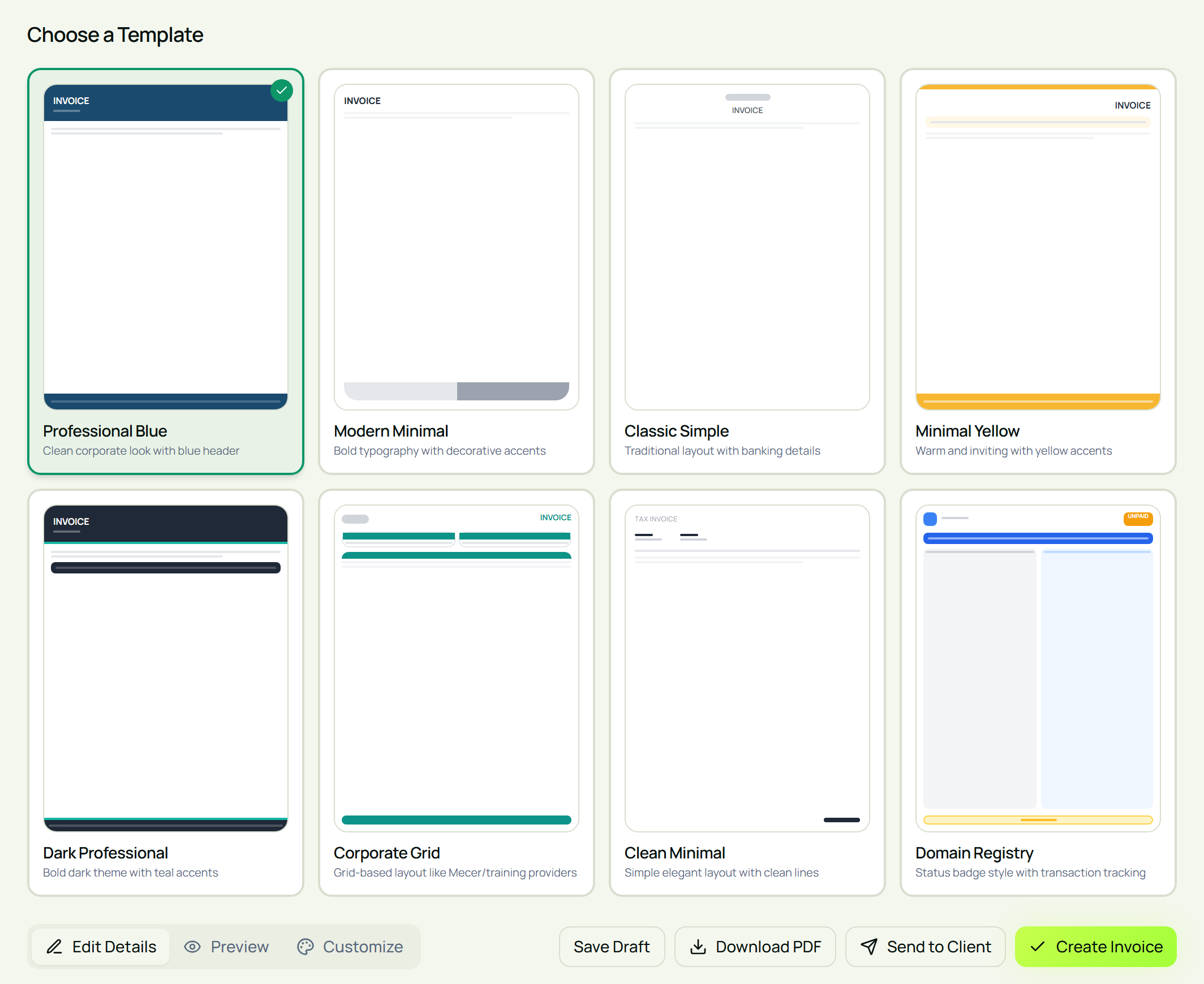
| Template | Good for | Plan |
|---|---|---|
| Professional Blue | Consultants, professional services, corporate clients | Free, Standard, Pro |
| Modern Minimal | Freelancers and creatives | Free, Standard, Pro |
| Classic Simple | Trades and traditional businesses | Standard, Pro |
| Clean Minimal | Coaches, tutors, photographers, short invoices | Standard, Pro |
| Corporate Grid | Training providers, suppliers, long invoices | Standard, Pro |
| Minimal Yellow | Cafés, caterers, events, friendly brands | Pro |
| Dark Professional | Tech companies and agencies | Pro |
| Domain Registry | Hosting, domains and subscription services | Pro |
When you create an invoice, the first step is Choose a Template. Click a template to select it. On the Free plan, locked templates can still be previewed, so you can see what they look like before upgrading.
To make any template your own:
- Upload your company logo in the invoice form.
- Add VAT or registration numbers to your business or client address line, so they print on the invoice.
- Add notes and terms and conditions at the bottom of the invoice.
- Add your banking details so clients know exactly how to pay.
- Change the template colours to match your brand, on the Pro plan.
Check everything in the Preview tab, then download your invoice as a PDF. PDFs on the Standard and Pro plans are watermark-free.
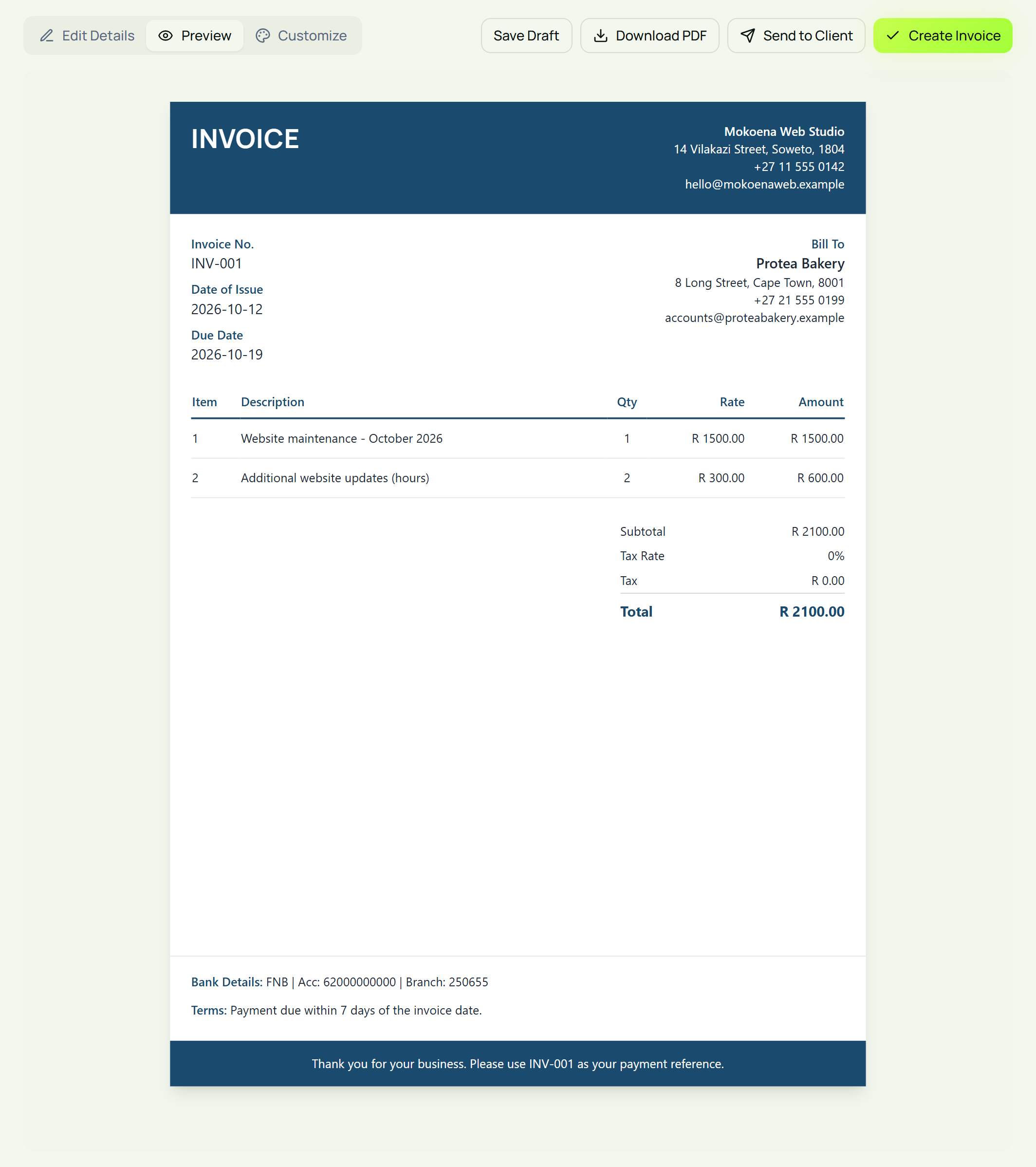
New to invoicing? Our step-by-step guide on how to create and send your first invoice walks through every field.
Frequently asked questions
What should every invoice include?
Your business name and contact details, the client's details, a unique invoice number, the invoice date and due date, a description of each item or service with quantity and price, the total amount due, and your payment details. If you're VAT registered, there are extra requirements for tax invoices.
Does the invoice template affect how quickly I get paid?
It can. A clear invoice with an obvious total, due date and banking details removes reasons for delay. Clients are less likely to put an invoice aside to "ask about later" when everything they need is on the page.
Should my invoice match my branding?
Yes. Using your logo and brand colours makes your invoice instantly recognisable and helps your business look established. Keep it simple, though: clarity matters more than decoration.
Is it better to send an invoice as a PDF or a Word document?
A PDF. It looks the same on every device, prints correctly and can't be edited by accident. Word documents can display differently on your client's computer.
Can I use the same template for quotes and invoices?
Yes, and it's a good idea. Matching quotes and invoices look more professional and make it easy for clients to connect the two. In Eazy-Biz, quotes and invoices use the same templates.
How often should I change my invoice template?
Rarely. Pick one that suits your business and stick with it. Change it only when your brand changes, so clients always recognise your invoices.
Create a professional invoice in minutes
The right template makes your invoices clear, recognisable and easy to pay. Pick a layout that suits your clients, add your logo and banking details, and use it consistently.
Eazy-Biz gives you eight invoice templates, logo upload and watermark-free PDF downloads on paid plans, built for South African small businesses.
Get started with Eazy-Biz and send an invoice that looks as good as your work.
This article is general information for South African business owners and is not tax, legal, or financial advice. Rules and thresholds change, so confirm your position with SARS or a registered tax practitioner before acting on it.