How to Organise Your Client Details, Quotes and Invoices in One Place
Stop hunting through emails, spreadsheets and folders. A simple system for keeping client details, quotes, invoices and documents together, with naming tips and a weekly routine for South African small businesses.
A client calls about a quote you sent in March. Was it the one in your email, the Word document on your laptop, or the PDF on your phone? And did that job ever get invoiced?
If that sounds familiar, the problem is not you. It is that your client details, quotes and invoices live in five different places. Every time you need something, you have to search all of them.
This guide shows you how to bring everything together, how to name and number things so you can always find them, and a short weekly routine that keeps it tidy.
The short answer
To organise your client details, quotes and invoices:
- Pick one place where every quote and invoice is created and stored.
- Enter your own business details once, so they fill in automatically.
- Write client details the same way every time, so searching by name always works.
- Number everything in sequence, with separate series for quotes and invoices.
- Keep quotes and invoices connected, so an accepted quote becomes its invoice.
- Store contracts and receipts next to the work they belong to.
- Spend ten minutes a week updating statuses and filing anything new.
Why scattered admin costs you money
Disorganised paperwork is not just annoying. It has real costs:
- Missed invoices. Work gets done but never billed because the quote was in a different place.
- Late payments. If you can't see who owes you, you can't follow up.
- Mistakes. Retyping client details and prices from one document to another is where errors creep in.
- Wasted time. Every search through email, WhatsApp and folders is time you're not paid for.
- Tax-time stress. SARS generally expects you to keep business records, including invoices and receipts, for five years. Finding them later is much harder than filing them now.
Step 1: Choose one home for your quotes and invoices
The single biggest improvement is deciding that every quote and every invoice starts in the same place. Not sometimes in Word, sometimes in a spreadsheet and sometimes in an app.
That place should let you:
- Create both quotes and invoices.
- See a list of everything you've sent, with a status.
- Search by client name or document number.
- Download a PDF to send.
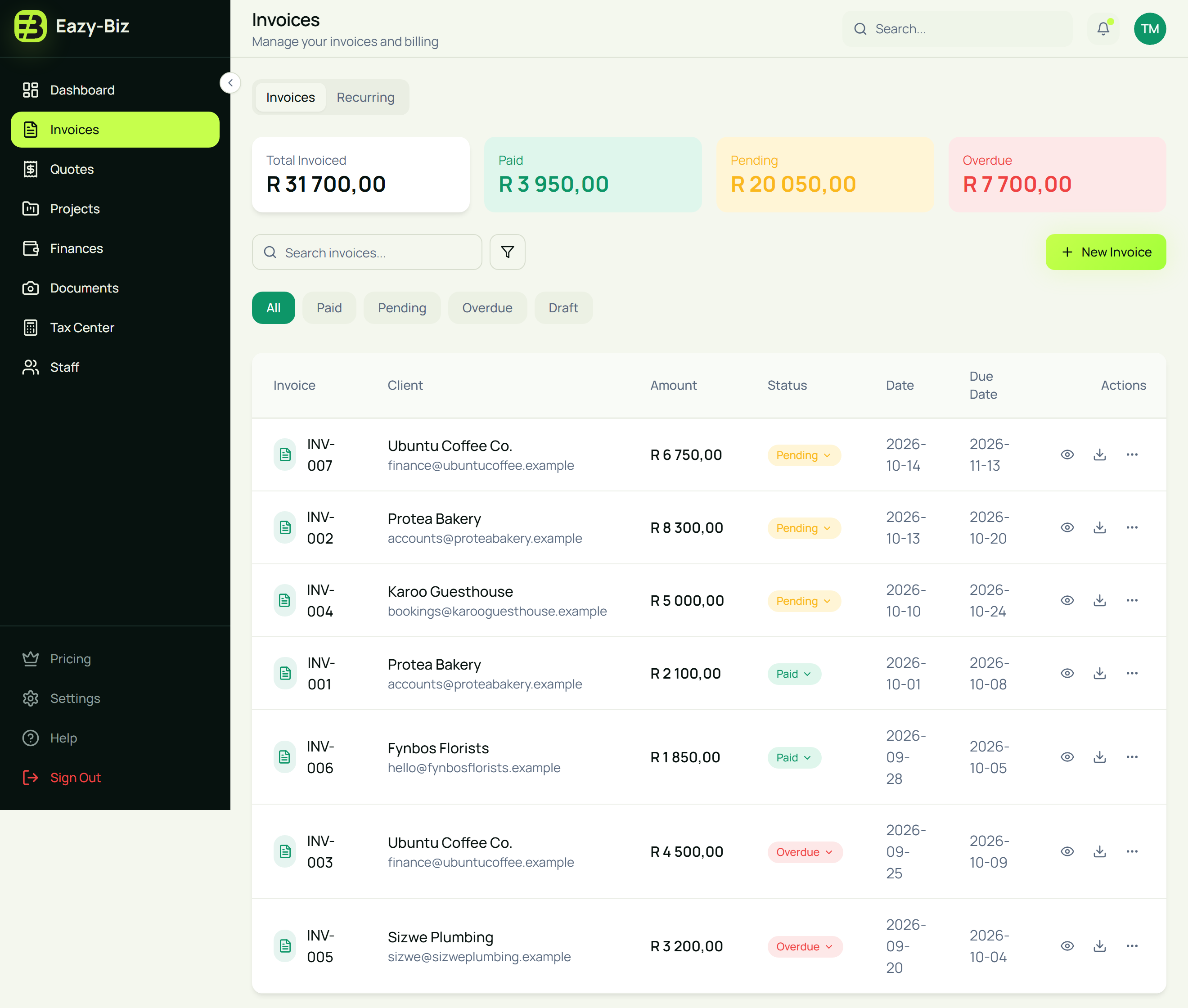
In Eazy-Biz: quotes live under Quotes and invoices under Invoices in the menu on the left. Both lists can be searched by client name or document number and filtered by status, so you can find anything in seconds.
Step 2: Enter your business details once
Your own name, address, contact details, logo and banking details should never need retyping. Typing them each time is slow, and it's how a wrong account number ends up on an invoice.
In Eazy-Biz: go to Settings, then Business. Add your business name, contact details, address, logo and banking details. They're filled in automatically on every new quote and invoice. If you're VAT registered, include your VAT number in your business address so it prints on every invoice.
Step 3: Keep client details consistent
When client details are written differently on every document, searching stops working. "Harbour & Pine", "Harbour and Pine Studio" and "H&P" look like three different clients.
Pick one format and stick to it:
- Use the client's registered or trading name, written the same way every time.
- Add a contact person to the address if you deal with someone specific.
- Use their accounts email for invoices, not just the person who asked for the quote.
- Record what your client needs on the paperwork, such as their VAT number, company registration number or purchase order number.
In Eazy-Biz: client details go under Bill To on each quote and invoice: name, email, phone and address. Add anything extra your client needs, such as their VAT number or a purchase order number, to their address line so it prints on the document. Because your quotes and invoices lists can be searched by client name, writing the name consistently means a single search shows a client's whole history.
Tip: if you're VAT registered and the invoice is over R5,000, a full tax invoice must show your client's name and address, and their VAT number if they're registered. See what makes a valid tax invoice in South Africa.
Step 4: Number quotes and invoices separately
A clear numbering system makes every document easy to find and refer to.
| Document | Example | Why |
|---|---|---|
| Quote | QT-001, QT-002, QT-003 | Easy to tell apart from invoices |
| Invoice | INV-001, INV-002, INV-003 | Invoice numbers should be unique and run in order |
Ask clients to use the invoice number as their payment reference. Then matching a payment in your bank statement to the right invoice takes seconds.
In Eazy-Biz: your first quote is QT-001 and your first invoice is INV-001. Each new one continues from your last number. You can type your own number if you already use a system.
Step 5: Keep quotes and invoices connected
The most common gap in small-business admin is between the quote and the invoice. The client accepts, the work gets done, and then someone has to remember to invoice it, often by retyping everything.
When quotes and invoices live together, an accepted quote can become the invoice:
- No retyping client details or line items.
- The invoice matches what the client agreed to.
- You can see which accepted quotes have been invoiced.
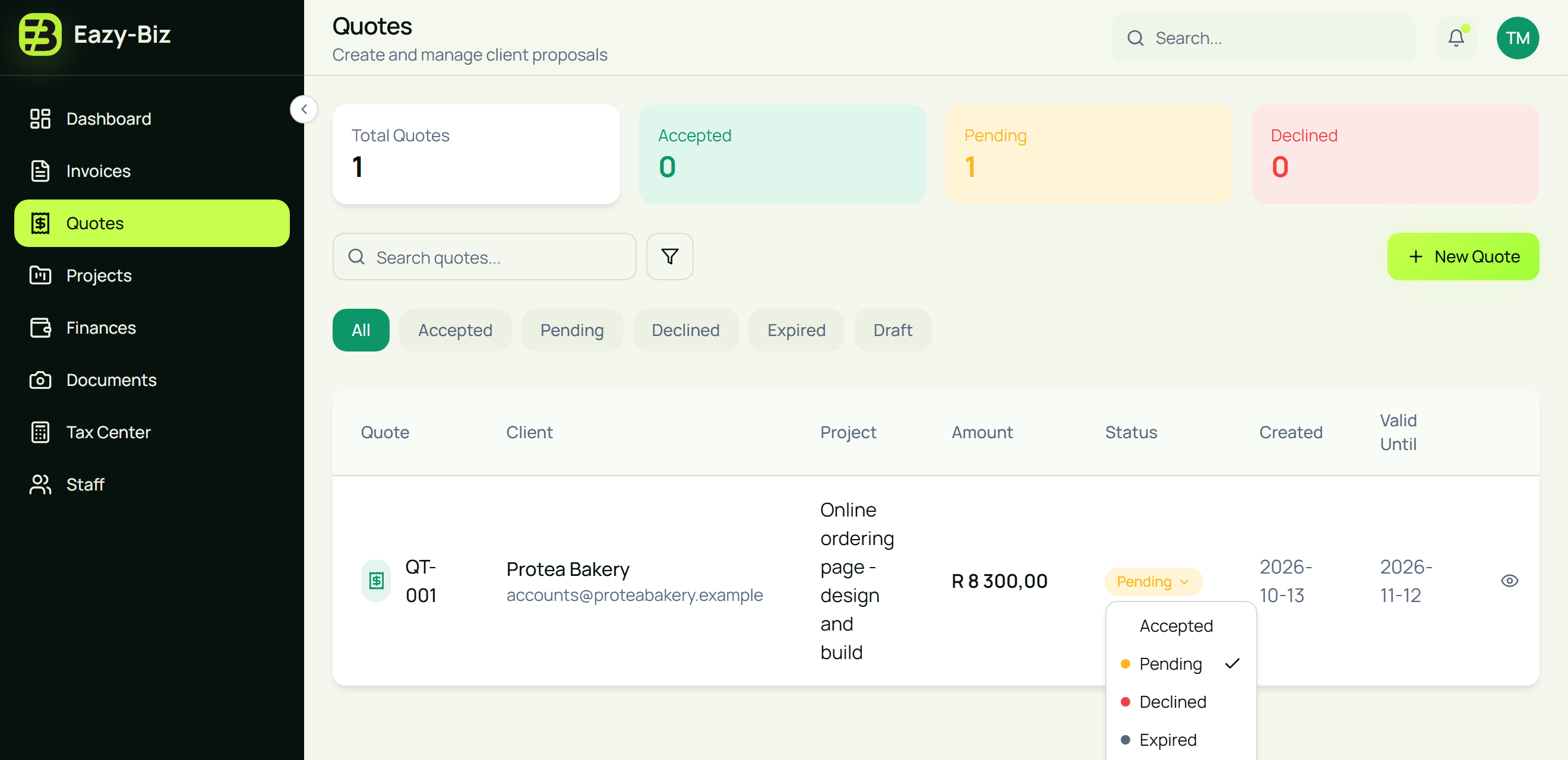
In Eazy-Biz: when a client says yes, set the quote's status to Accepted. On the Standard and Pro plans, a draft invoice is created automatically with the client details and line items already filled in. Our guide to the quote-to-invoice workflow walks through every step.
Step 6: Use statuses to see where everything stands
A status turns a pile of documents into a to-do list. You should be able to answer these questions at a glance:
- Which quotes are still waiting for an answer?
- Which invoices are unpaid?
- Which are overdue?
In Eazy-Biz: quotes can be Accepted, Pending, Declined, Expired or Draft. Invoices can be Paid, Pending, Overdue or Draft. The cards at the top of each list total them up, and the filters show just one status. For a simple routine to chase late payments, read how to track unpaid invoices without a spreadsheet.
Step 7: Group bigger jobs as projects
If one client job involves several quotes, invoices or months of work, it helps to see it as a whole: what was agreed, what has been paid and what's still due.
In Eazy-Biz: under Projects, add each job with the client name, status, start and due dates, budget and amount paid. You can group projects into buckets, such as "Client work" and "Internal", so ongoing work is easy to scan.
Step 8: Store documents with the work
Signed quotes, contracts, purchase orders and receipts are part of the record. Keeping them in a separate folder system means two places to search.
In Eazy-Biz: under Documents, upload contracts, receipts and other paperwork and sort them into Business or Personal. Document storage is included on paid plans: 50 documents on Standard and unlimited on Pro. Expense receipts can also be attached directly to each expense under Finances.
A 10-minute weekly routine
Once everything lives in one place, keeping it tidy takes about ten minutes a week. Pick a regular time, such as Friday afternoon:
- Update quote statuses. Mark anything accepted, declined or expired.
- Invoice finished work. Check that every accepted, completed job has an invoice.
- Mark payments. Compare your bank statement with your Pending invoices and mark what's been paid.
- Check Overdue. Send a friendly reminder for anything past its due date.
- File new paperwork. Upload contracts or receipts that arrived this week.
Moving from spreadsheets and folders
You don't need to move years of history in one go. A practical approach:
- Start with new work. Create every new quote and invoice in your new system from today.
- Add open items. Re-create any quotes still waiting for an answer and invoices still unpaid, so you can track them.
- Leave closed history where it is. Keep old paid invoices in a clearly named archive folder for your records. You still need them for SARS, but you don't need them in your day-to-day list.
Frequently asked questions
What is the best way to organise invoices for a small business?
Create and store every invoice in one system, number them in sequence, use a status (Paid, Pending, Overdue) on each one, and ask clients to use the invoice number as their payment reference. Review your list once a week.
How should I organise client information?
Write each client's name the same way every time, use their accounts email for invoices, and record anything they need on the paperwork, such as a VAT number or purchase order number. Consistency is what makes searching by client work.
Should quotes and invoices be kept together?
Yes. Keeping them in the same place means an accepted quote can become its invoice without retyping, and you can see at a glance which accepted jobs have been invoiced.
How long must I keep invoices and quotes in South Africa?
SARS generally expects businesses to keep records, including invoices and receipts, for five years. Keep them stored safely and in an order you can search.
Can I use Eazy-Biz if I already have invoices in a spreadsheet?
Yes. Start by creating new quotes and invoices in Eazy-Biz, then add any open quotes and unpaid invoices so you can track them. Keep older, closed records in an archive for your files.
Does Eazy-Biz have a separate client list?
Client details are entered on each quote and invoice, and you can search your Quotes and Invoices lists by client name to see everything for that client. Your own business details are saved once in Settings and filled in automatically.
Keep everything together with Eazy-Biz
Organised admin is not about being naturally tidy. It's about having one place for everything and a short routine to keep it current.
Eazy-Biz keeps your quotes, invoices, statuses, projects and documents together, with your business details filled in automatically, built for South African small businesses. Need to send a quote today? Try our free quote generator.
Get started with Eazy-Biz and stop searching for your paperwork.
This article is general information for South African business owners and is not tax, legal, or financial advice. Rules and thresholds change, so confirm your position with SARS or a registered tax practitioner before acting on it.