Is Your Business Making Money? How to Read a Simple Profit and Loss Report
A plain-language guide to reading a profit and loss report, working out your profit margin and spotting problems early, with a worked example for small businesses.
Money comes in. Money goes out. At the end of the month there is something left in the bank, or there isn't. But is your business actually making money?
Your bank balance cannot answer that question on its own. A profit and loss report can.
This guide explains what a profit and loss report is, how to read each line, and which questions to ask of it. You do not need an accounting background, just a few minutes each month.
What is a profit and loss report?
A profit and loss report (often shortened to P&L, and also called an income statement) shows how much your business earned, how much it spent, and what was left over during a set period.
The basic formula is simple:
Income - Expenses = Profit (or Loss)
If the answer is positive, you made a profit for that period. If it is negative, you made a loss.
The period matters. A P&L always covers a specific stretch of time, such as a month, a quarter or a year. "Profit in September" and "profit this year" are two different numbers, and both are useful.
Profit is not the same as cash in the bank
This is the point that trips up most small business owners.
- Profit tells you whether your work earns more than it costs over a period.
- Cash is the money you can actually spend today.
They drift apart for everyday reasons. A client pays an invoice late. You buy a laptop in one month that you will use for three years. You pay an annual software renewal upfront.
So you can be profitable and still short of cash, or have a healthy bank balance while quietly losing money. You need both views. The P&L tells you whether the business works. Your bank balance and a list of unpaid invoices tell you whether you can pay this month's bills.
The parts of a profit and loss report
A full P&L prepared by an accountant usually has these sections:
| Line | What it means | Example for a design studio |
|---|---|---|
| Income (revenue or sales) | Money earned from your products or services. | Client work invoiced and paid |
| Cost of sales | Costs tied directly to delivering the work. | Printing, stock photos bought for a client |
| Gross profit | Income minus cost of sales. | What the work itself earns |
| Operating expenses | The running costs of the business. | Software, rent, internet, marketing, travel |
| Net profit | Gross profit minus operating expenses. | What the business actually made |
A simple P&L, the kind most freelancers and small businesses need day to day, combines this into three numbers: income, expenses and profit or loss. That is enough to answer the big question, and it is how the report in Eazy-Biz is laid out.
How to read a simple profit and loss report
Here is the profit and loss report for a small web design business over four months, from the Reports tab under Finances in Eazy-Biz.
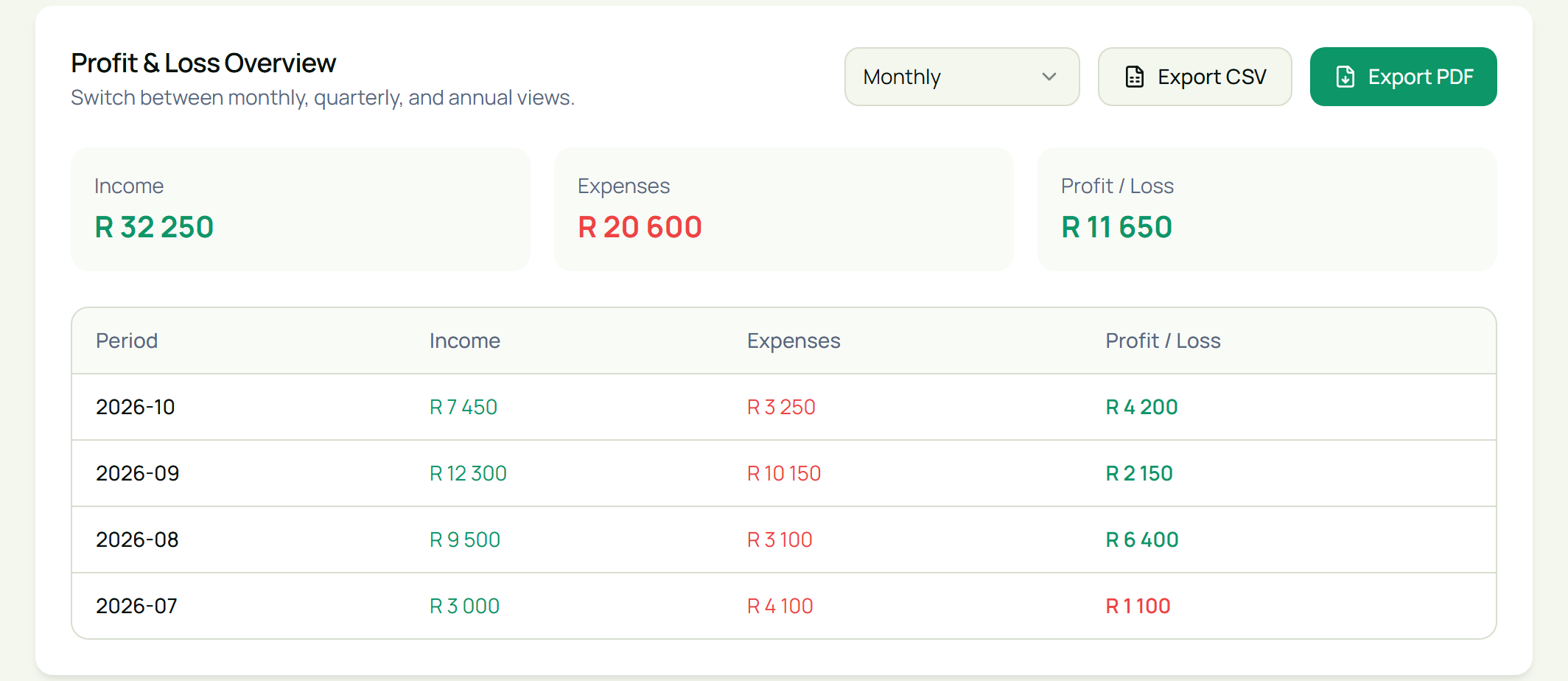
Read it in this order.
1. Start with the bottom line
Look at Profit / Loss first. Across the four months, this business earned R32,250, spent R20,600 and made a profit of R11,650.
In the monthly rows, profitable months show in green and loss-making months show in red. July is red: the business spent R1,100 more than it earned.
2. Look at the trend, not one month
A single month can mislead you. Compare the rows:
| Month | Income | Expenses | Profit / Loss |
|---|---|---|---|
| July | R3,000 | R4,100 | Loss of R1,100 |
| August | R9,500 | R3,100 | R6,400 |
| September | R12,300 | R10,150 | R2,150 |
| October (so far) | R7,450 | R3,250 | R4,200 |
September had the highest income but one of the lowest profits. If you only looked at income, you would think September was the best month. The P&L shows otherwise.
3. Find out what drove the expenses
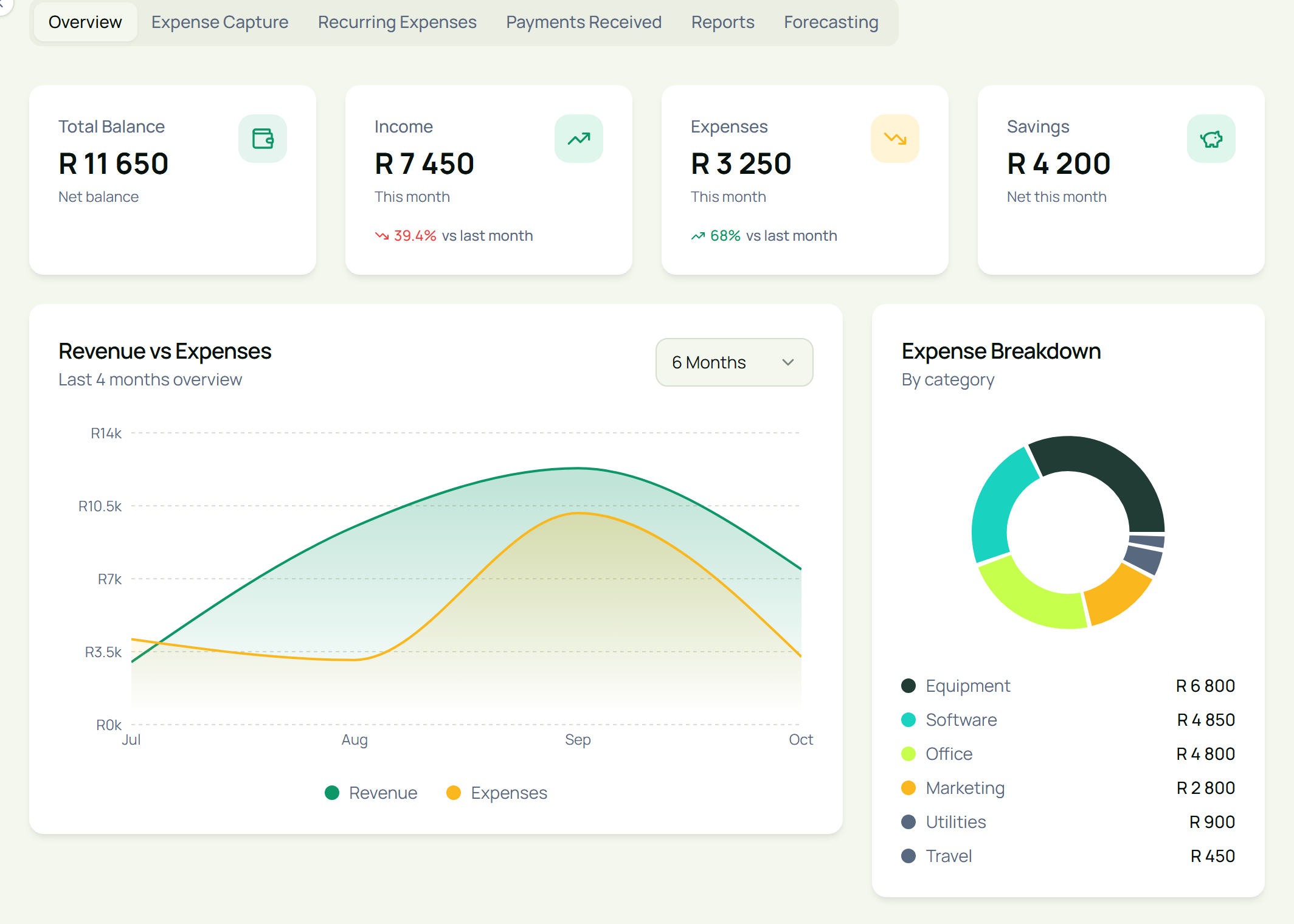
When profit drops, look at expenses next. In this example, September's expenses jumped because of a R6,800 laptop, and July's loss came from an annual hosting renewal of R2,250 in a quiet month.
Neither is a sign of a failing business. They are one-off costs, and that is an important difference:
- One-off costs (equipment, annual renewals) make a single month look worse than the business really is.
- Recurring costs (software subscriptions, rent, internet) come back every month and set the minimum you need to earn.
If your recurring costs keep creeping up while income stays flat, that is the pattern to act on.
The Overview tab breaks expenses down by category, so you can see where the money goes at a glance.
4. Work out your profit margin
Profit in rands is useful. Profit as a percentage of income is often more useful, because it lets you compare months of different sizes.
Profit margin = Profit ÷ Income × 100
For this business:
- October: R4,200 ÷ R7,450 × 100 = 56%
- September: R2,150 ÷ R12,300 × 100 = 17%
- All four months: R11,650 ÷ R32,250 × 100 = 36%
A falling margin means each rand of income is keeping less profit. That usually points to rising costs, prices that have not kept up, or jobs that take longer than you quote for.
5. Switch between monthly, quarterly and annual views
Use the Monthly drop-down at the top of the report to switch to Quarterly or Annual. Monthly views show you what is happening now. Quarterly and annual views smooth out one-off costs and show you whether the business is growing.
Five questions to ask your P&L every month
- Did I make a profit this month? If not, was it a one-off cost or a real problem?
- Is my profit going up or down over the last three months?
- Which expense category grew the most? Was that a choice or a surprise?
- Is my profit margin holding steady?
- Will this month's profit cover my tax? Profit is taxable, so set some aside. Our guide to provisional tax for freelancers and sole proprietors explains how it works.
Where the numbers come from in Eazy-Biz
A profit and loss report is only as accurate as the records behind it. In Eazy-Biz:
- Income comes from invoices you mark as Paid, plus any other money in that you log under Payments Received.
- Expenses come from what you record under Expense Capture, each with a category, a date and, if you have one, a receipt.
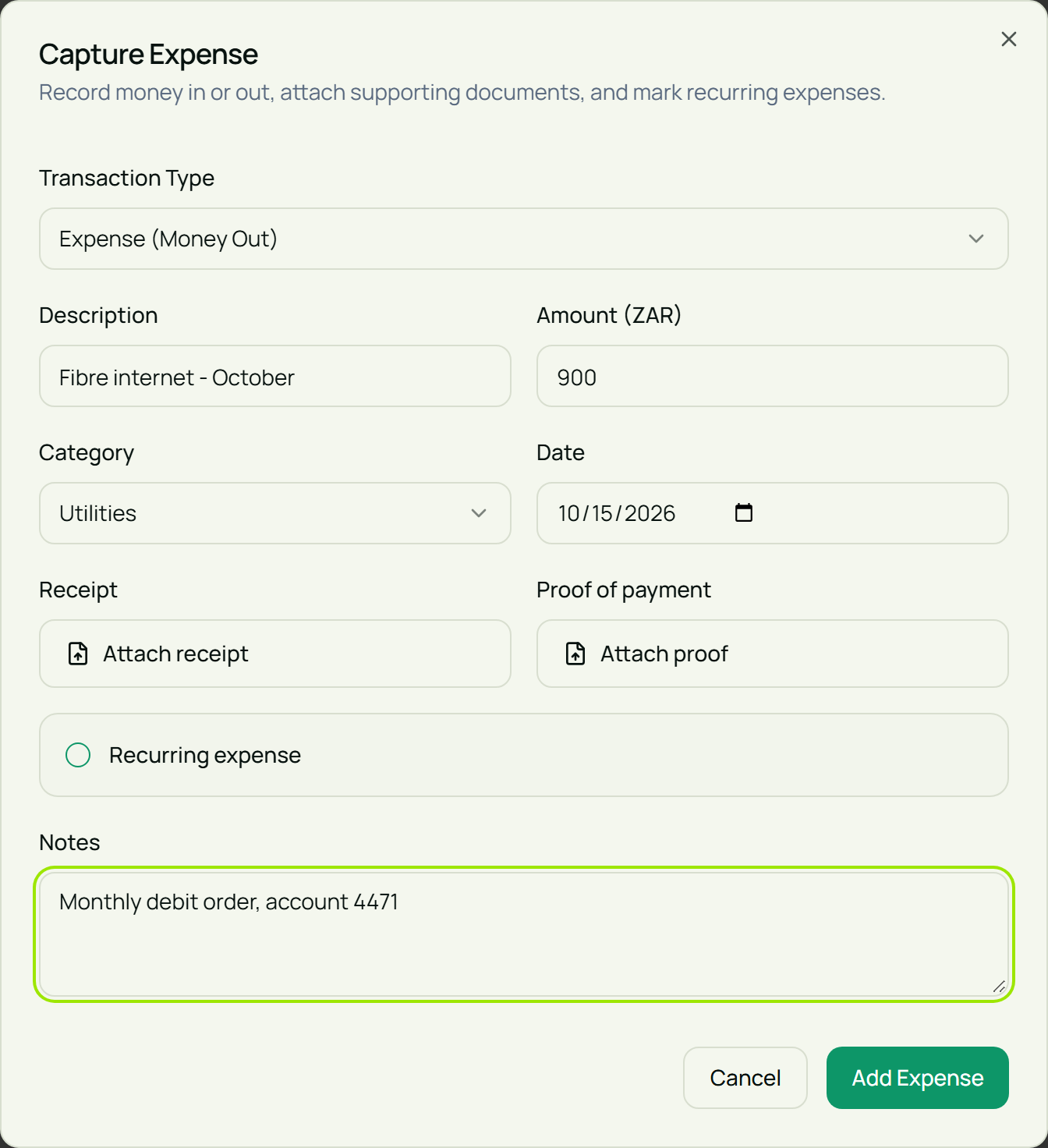
Keep these habits and your report stays trustworthy:
- Mark invoices Paid when the money arrives. An invoice left on Pending is not counted as income.
- Don't count the same payment twice. A paid invoice is already in your income, so there is no need to log that payment again.
- Capture every business expense, including small ones like data and fuel. Small costs add up.
- Tick Recurring expense for subscriptions, rent and debit orders, so you can see your fixed monthly commitments under Recurring Expenses.
- Keep loans and your own money out of income. If you put personal savings into the business or take a loan, that is not money the business earned.
- Mind VAT if you are registered. Invoice totals include the VAT you charged, and that VAT belongs to SARS. Your accountant will separate it out. See the VAT registration threshold if you are not sure whether this applies to you.
You can export the report with Export PDF or download all your transactions with Export CSV to share with your accountant or bookkeeper. The Finances section is part of the Standard and Pro plans.
A simple monthly routine
Set aside 15 minutes in the first week of each month:
- Mark any invoices that were paid last month as Paid.
- Capture any expenses you missed.
- Open Finances, then Reports, and read last month's row.
- Ask the five questions above.
- Write down one thing to change, such as a price to raise or a subscription to cancel.
Do this every month and the year-end conversation with your accountant gets a lot shorter.
Frequently asked questions
What is the difference between a profit and loss report and a balance sheet?
A profit and loss report shows income and expenses over a period. A balance sheet is a snapshot of what the business owns and owes on a single date. Small businesses usually start with the P&L, because it answers whether the business is making money.
Why do I have profit but no cash?
Usually because clients have not paid yet, or you spent cash on something that is not counted as an expense in the same way, such as paying off a loan. Check your unpaid invoices and your upcoming bills alongside your P&L.
How often should I look at my profit and loss report?
Monthly is a good habit for most small businesses. Look at the quarterly and annual views a few times a year to see the bigger trend.
What is a good profit margin for a small business?
It depends on your industry. Service businesses with few direct costs, such as design or consulting, often have higher margins than businesses that buy and resell stock. The most useful comparison is your own margin over time.
Is a profit and loss report the same as a tax return?
No. Your P&L is a management tool that helps you understand your business. Your accountant or tax practitioner uses your records to prepare your tax return, which follows SARS rules on what counts as income and which expenses you can deduct.
Can I share my profit and loss report with my accountant?
Yes. In Eazy-Biz you can export the profit and loss report as a PDF and your transactions as a CSV file.
See your profit at a glance with Eazy-Biz
You do not need to be an accountant to know whether your business is making money. Record your income and expenses as you go, read your P&L once a month, and ask the right questions.
Get started with Eazy-Biz and see your profit and loss in one place.
This article is general information for South African business owners and is not tax, legal, or financial advice. Rules and thresholds change, so confirm your position with SARS or a registered tax practitioner before acting on it.